Why You Need to Setup Bloodhound MCP and Codex Right Now

TD;LR
Yo bro! Just like the title you see above, since my current projects are finally wrapped up, I want to talk about something pretty exciting: how we can leverage the Model Context Protocol (MCP) and Codex to help analyze BloodHound.
This idea actually crossed my mind while I was playing around in my local lab. For those of you who frequently tinker with Active Directory environments, you are probably familiar with GOAD (Game of Active Directory).
I happen to have just upgraded my daily driver from a ThinkPad X13 Gen 2 (16GB) to a ThinkPad T14s Gen 3 (32GB). Since I have plenty of RAM breathing room now, I went ahead and deployed the Full version of the GOAD lab—no more Light or Minilab versions for me. I've been trying to pawn the lab completely blind without peeking at any WUs (WriteUps) because I wanted to use it as preparation for the CPTS.
So, while I was playing, specifically when I was enumerating one of the domains, a random thought popped into my head: "Is there an MCP server for BloodHound out there?"_
I did a quick Google search, and surprisingly, there was already a GitHub repository for it! So, without wasting any time, I decided to take it for a spin.
For context, this BloodHound MCP is written in Python. Since I'm the type of guy who hates having system-wide Python packages cluttered everywhere, I ran the setup using a venv (Virtual Environment). Why? Just to keep everything clean and ensure that all the installed libraries remain properly isolated within the project directory.
But wait, before we go any further with the setup, it's probably a good idea to take a step back and talk about what MCP actually is and why it's so damn useful.
Whats is MCP ?
MCP stands for Model Context Protocol. In simple terms, it's an open standard that acts as a universal bridge, allowing AI models (whether you're using a cloud API or running local LLMs) to securely connect and talk to your local data, files, and external tools.
So, what's the actual use case? Usually, if you want an AI to help you analyze something, you have to do the tedious copy-paste dance. You copy the output from your terminal or tool, paste it into the chat interface, wait for the answer, and repeat. With MCP, you skip all that nonsense. It gives the AI "hands and eyes" to interact with your environment directly.
For us in the offensive security space, the use cases are massive. Instead of manually moving data around, you could have an MCP server that hooks your AI agent directly into Burp Suite to analyze HTTP traffic on the fly, or connect it to Notion to automatically organize and draft your pentest reports based on your raw findings.
And in the context of this article, we are using MCP to plug our AI straight into BloodHound. Instead of manually tracing complex AD relationships or writing custom Cypher queries to find that one obscure attack path, we can just let the AI query the BloodHound database directly.
Enter BloodHound-MCP
So, how does this actually tie into our GOAD lab? Enter BloodHound-MCP.
This bad boy is officially the first-ever AI integration for BloodHound. It essentially combines three core technologies: BloodHound (our go to, industry-standard tool for mapping AD attack paths), MCP (the open protocol acting as the bridge), and Neo4j (the graph database running under the hood to store all those AD relationships).
The coolest part about this integration? It comes packed with over 75 specialized tools built directly on top of the original BloodHound Community Edition Cypher queries.
What this means for us as security professionals is that you no longer need to be a Cypher ninja to hunt for complex attack paths. By hooking this up, you can:
- Query your BloodHound data using natural language. (Literally just ask the AI to find paths to Domain Admin).
- Easily discover deep, complex attack vectors hidden in your AD environment.
- Assess the overall Active Directory security posture way faster.
- Automatically generate detailed security reports to hand off to stakeholders.
In short, it takes the heavy lifting out of analyzing raw AD data and makes attack path analysis accessible to everyone.
Alright, now that we're on the same page, let's get back to the setup.
Setup Bloodhound MCP
You can clone the repository anywhere you like, just pick a path that won't make things a hassle for you later on:
git clone https://github.com/mordavid/MCP-BloodHound.git
cd MCP-BloodHound
Like I mentioned earlier, to keep your system packages from turning into a complete mess, it's highly recommended to use venv. This way, all the dependencies we install from requirements.txt stay neatly isolated and don't clutter your global environment.
python3 -m venv venv && . venv/bin/activate
pip install -r requirements.txt
As for the Codex configuration, you can just adjust it to match your own setup. For reference, here is what my config looks like:
[mcp_servers.BloodHound-MCP]
command = "/home/0xc4t/pentest/ad/bloodhound-mcp-ai/.venv/bin/python"
args = ["/home/0xc4t/pentest/ad/bloodhound-mcp-ai/BloodHound-MCP.py"]

[mcp_servers.BloodHound-MCP.env]
BLOODHOUND_URI = "bolt://127.0.0.1:7687"
BLOODHOUND_USERNAME = "neo4j"
BLOODHOUND_PASSWORD = "varel123"
Just make sure to change the Neo4j username and password to whatever you're using in your lab. The same goes for the directory paths—adjust them according to where you actually cloned the repo.
Once you are all set with the config, we can just run Codex, and it will automatically load the BloodHound MCP server:
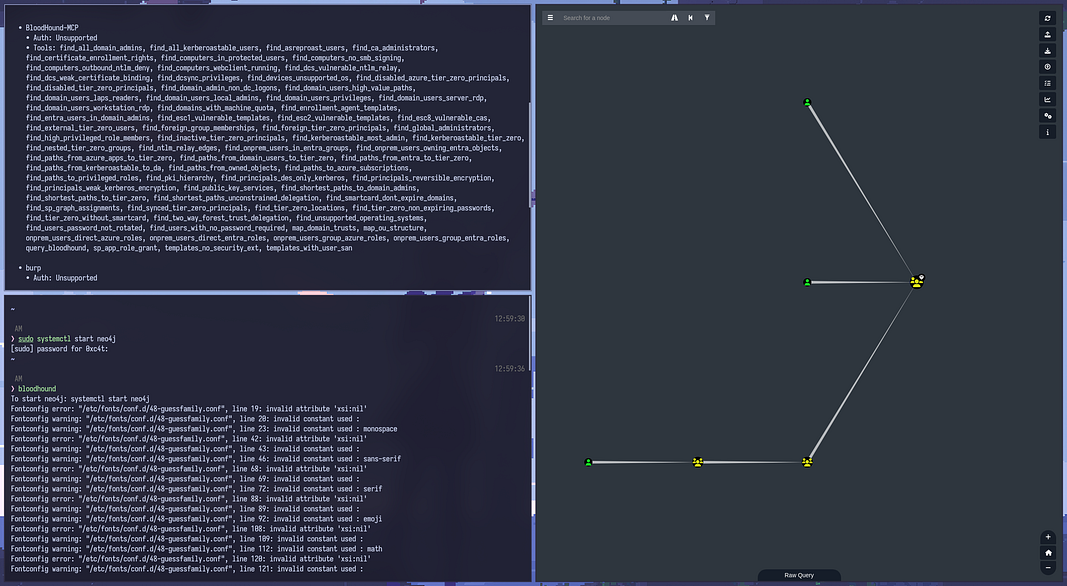
As a simple example here, I asked Codex to map out exactly what privileges we can leverage to get our hands on a Domain Admin account. So essentially, it's just building out an attack path for us.
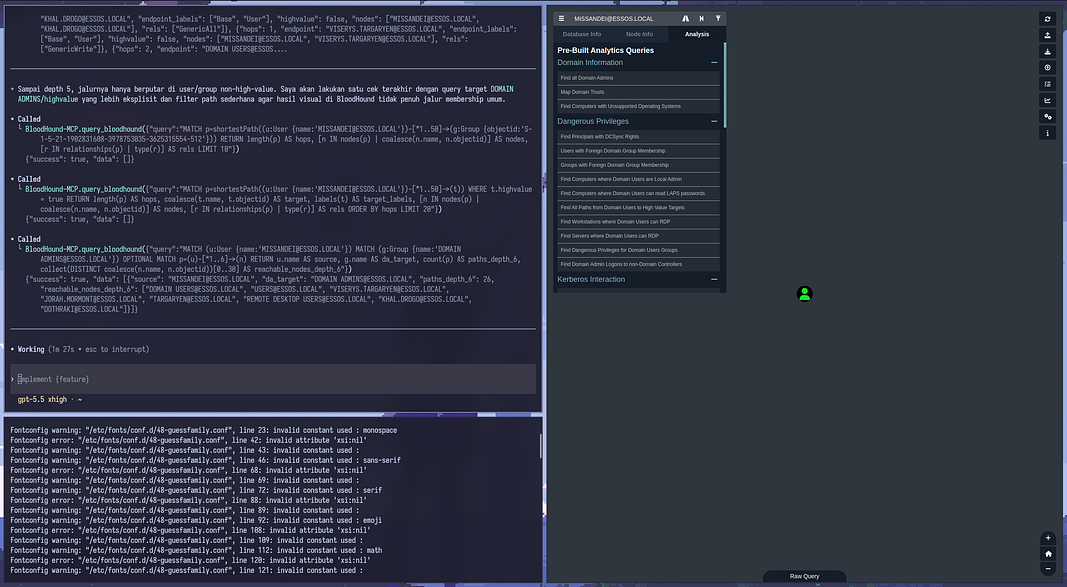
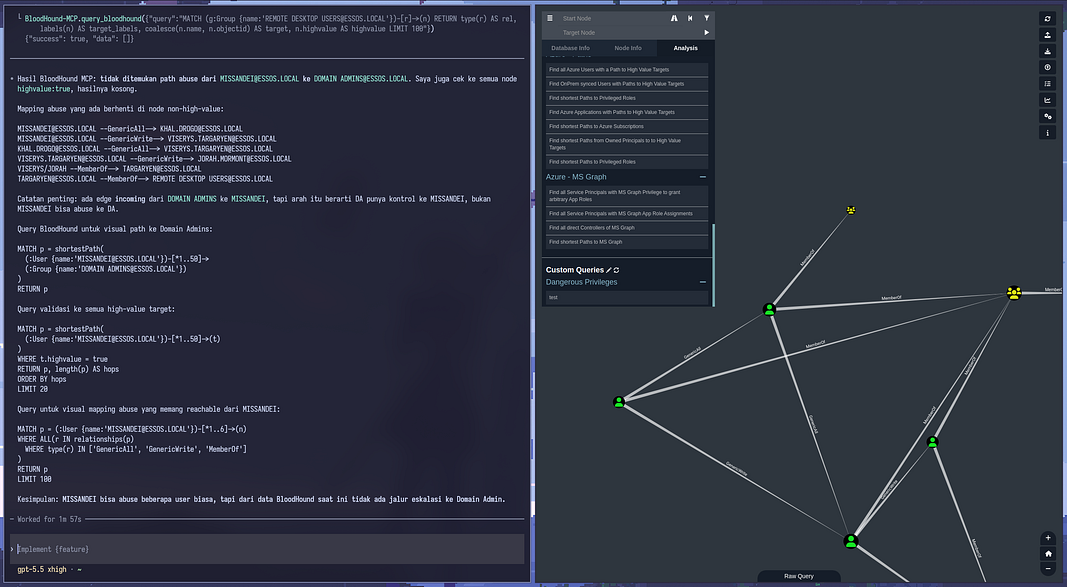
By throwing in a really simple prompt, we don't just get the Cypher query back we actually get the step-by-step instructions on how to abuse the DACL as well.
Conclusion
Pretty straightforward, right?
To be completely honest, with the US Dollar being so high right now and the Rupiah taking a hit, I don't exactly have the budget to shell out for a Claude subscription. So, I decided to just leverage Codex instead since it's completely free provided you route it through a Mexico VPN, hahaha.
Anyway, if there's any part of the explanation that's a bit hard to grasp, just shoot me an email at **iam0xc4t@gmail.com. Seriously, if you're stuck or have any questions, just hit me up and I'll do my best to answer them.
Huge thanks to you guys for reading this from start to finish. I really appreciate those of you who are always eager to learn and hustle. Also, if you catch any technical mistakes in my explanations, feel free to drop a correction to my email as well.
Catch you in the next post!